 IVGraph
Why Most Second Brains Die by February
The pattern is always the same: an inspired weekend of setup, three weeks of diligent capturing, then a slow drift into a write-only archive. The cause isn't discipline — it's economics. In a manual system, every note costs effort twice: once to write, once to keep connected to everything else. The second cost grows with the size of the base, so the more you capture, the heavier maintenance gets, until the system quietly loses to your camera roll.
A second brain survives when connections are cheap. That principle drives every choice below.
This guide is the Notion build. For the method itself — where the term comes from, CODE and PARA, and how other apps compare — see what a second brain is.
The Blueprint: Four Databases, Three Relations
| Database | What goes in | Key properties |
|---|---|---|
| 📥 Inbox | Everything, unsorted — links, thoughts, screenshots | Created (date), Status |
| 📚 Sources | Articles, books, videos, podcasts you processed | Type, Link, Rating; relation → Notes |
| 💡 Notes | Your own thinking: one idea per page, in your words | Topic; relations → Sources, Projects |
| 🎯 Projects | Anything with an outcome and an end date | Status, Due; relation → Notes |
The three relations are the skeleton: Notes ↔ Sources ("where did this idea come from"), Notes ↔ Projects ("where is it going"), and the free-form layer on top — @-mention backlinks between any two pages. Structured edges plus free edges: that combination is what later makes the whole thing renderable as a network.
Setup in 15 minutes
- Create the four databases as full-page tables.
- In Notes, add two relation properties: one to Sources, one to Projects. Toggle Show on… for both so the links are visible from either side.
- Add a rollup on Projects counting linked Notes — a one-glance signal of which projects are starving for input.
- Pin Inbox to your sidebar and phone home screen. Capture friction is system death; one tap or nothing.
The Loop That Keeps It Alive
- Capture (daily, seconds): everything lands in Inbox. No sorting at capture time — that's the trap.
- Organize (2× a week, 10 min): empty the Inbox — each item becomes a Source, a Note, a Project task, or gets deleted. Deleting is allowed and encouraged.
- Distill (when processing a Source): write what you think in a Note, link it to the Source and to related Notes with @-mentions.
- Express (whenever you make something): pull from Notes into Projects. Output is the point; storage is just the means.
Upgrade 1: Let an LLM Do the Maintenance
The distill step is where humans quit — and it's exactly what LLMs automate well now. Connect Claude Code to your workspace through Notion MCP and the expensive parts become prompts: summarize this source into a Note, find related-but-unlinked pages, run the weekly review. We published our five exact recipes in Claude Code + Notion: Five Workflows, and the concept behind the whole approach in What Is an LLM Wiki?
Upgrade 2: See Whether It's Working
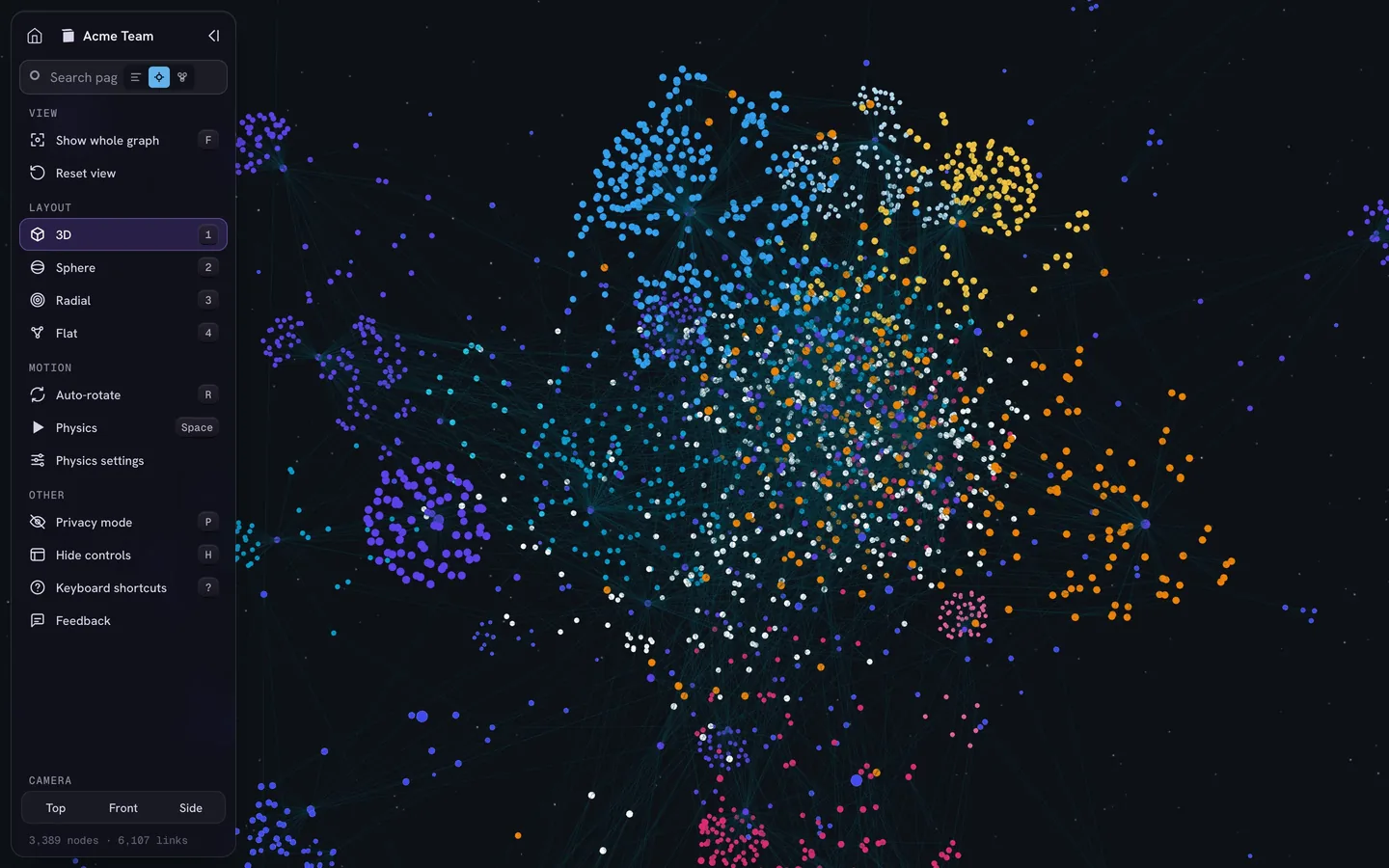
A second brain has one honest health metric: is it getting more connected, or just bigger? Notion can't show you that — each backlink list is a keyhole. Open the same workspace in IVGraph and the answer is visual: Notes clustering around Sources, Projects pulling in ideas, orphan pages drifting alone (those are your February casualties — reconnect or delete them). It's the difference between believing your system works and seeing it.
Want This as a One-Click Template?
Everything above is reproducible by hand in about 15 minutes — that's deliberate, you'll understand your own system better. We're also packaging this exact blueprint (databases, relations, rollups, sample content) as a free Notion template for the community. Ping us in Telegram @ivgraph and we'll send it your way when it ships.
FAQ
Is Notion good for a second brain?
Yes — databases, relations, and backlinks are strong raw material, and collaboration is native. The missing piece is visibility of connections, which is what the graph layer adds.
How is this different from PARA or Zettelkasten?
Compatible, not competing: PARA gives the actionability split (Projects first), Zettelkasten gives the linking habit (one idea per note, always connected). This blueprint borrows both.
Do I need the LLM layer from day one?
No. The four databases work purely manually. Add the MCP connection when the maintenance starts feeling heavy — that's usually around a few hundred pages.
What does IVGraph add to a second brain?
The map: every page as a node, every relation and backlink as an edge, in interactive 3D. Free up to 500 nodes — enough for a young second brain to see itself for the first time.