 IVGraph
Relation vs Rollup in One Minute
A relation is a database property whose values are pages from another database. A text column holds words; a relation column holds live links: each Task points at its Project, each Meeting note at its Client. Notion's own help uses Customers and Items Purchased: one relation, readable from both sides.
A rollup is a property that looks through a relation and calculates something from the related pages: how many tasks a project has, what percent of them are done, how much a customer has spent, when you last met a client. No relation, no rollup.
| Relation | Rollup | |
|---|---|---|
| What it stores | Links to pages | A calculated value (or the related values as they are) |
| Editable in the cell | Yes: pick or remove pages | No: it updates when related pages change |
| Needs | A target database | A relation + a property of the related pages |
| Example | Task → Project | Project → 60% of tasks done |
Both sit in the same property menu as Text, Number, Select, Status, Date, Formula, Checkbox, Person, Files & media, URL, Email, Phone, Button, ID, Place and the created/edited stamps. They are the two property types built specifically for working across databases.
Creating a Relation, Step by Step
- In your database (say, Tasks), click + New property and choose Relation.
- Pick the database to link to (Projects). Notion shows a preview of the new property.
- Decide whether the other database should see the link too (the toggle Show on Projects, see below).
- Optionally limit the property to 1 page instead of No limit: useful when every task belongs to exactly one project.
- Click Add relation. Each cell in the new column now opens a search of pages from Projects; the – next to a page removes the link.
One-way vs two-way relations
Relations are one-way by default: Tasks get a Project column, but Projects don't get a Tasks column. Switch on Show on [related database] and name the mirrored property to make it two-way. From then on, a project picked in a task's cell also shows that task in the project's cell, and the other way round. You can switch this on later for an existing relation in the same settings.
- Two-way when both sides need the link: Projects ↔ Tasks, Clients ↔ Meetings. A rollup on Projects needs a relation property on Projects, so for progress bars and counts the link must be two-way (or created from the Projects side).
- One-way when the other database would only get clutter: many note databases pointing at one shared Sources or Tags database.
If you build databases through the API or let an AI agent do it over Notion MCP, the same choice appears as single_property (one-way) or dual_property (two-way) in the relation property's definition.
Relate a database to itself: sub-items and dependencies
When creating a relation, you can pick the current database; it shows up as This database. With Two-way relation off you get one property that works in both directions (good for "Related notes"). With it on you get a pair, such as "Next task" and "Previous task". Self-relations are how a flat notes table quietly becomes a knowledge network.
Notion packages two self-relation patterns as ready-made features, both under Database settings → More settings:
- Sub-items → Turn on sub-items: tasks nest under parent tasks right in the table. Under Advanced settings you choose which property drives the nesting and whether sub-items or parent items are nested.
- Dependencies → Turn on dependencies: tasks that block other tasks, drawn as connections in timeline view. You also choose how dates shift: Shift only when dates overlap, Shift & maintain time between items, or Do not automatically shift, with an Avoid weekends toggle.
Rollups: Every Calculation Option
Add a property, choose Rollup, then make three choices: which relation to look through, which property of the related pages to read, and how to calculate. Since April 2026, rollups also take number formatting (currency, percent and so on) and decimal places directly.
| Calculate | Works on | Typical use |
|---|---|---|
| Show original | Any property | Show the related page's value as is (a task shows its project's deadline) |
| Show unique values | Any property | All tags used across a project's tasks, without repeats |
| Count all · Count values · Count unique values | Any property | How many related pages or values there are |
| Count empty · Count not empty · Percent empty · Percent not empty | Any property | How many tasks still have no owner or no date |
| Checked · Unchecked · Percent checked · Percent unchecked | Checkbox | Done vs not done; Percent checked is the progress bar |
| Count per group · Percent per group | Status | Tasks in the Complete group, as a count or a share |
| Sum · Average · Median · Min · Max · Range | Number | Total spend, average estimate, biggest invoice |
| Earliest date · Latest date · Date range | Date | First and last meeting, project span |
Sorting a view by a rollup works only when the rollup returns a number. For a total across the whole database (not per row), you don't need a rollup: click the property and use Calculate (for example, Sum).
Six Relation and Rollup Recipes
All six assume a working relation; recipes 1–4 need it to be visible on the database where you add the rollup (two-way, or created from that side).
1. Project progress bar with Percent checked
- Projects ↔ Tasks are related two-way; Tasks have a Done checkbox.
- In Projects, add a Rollup called Progress: relation Tasks, property Done, calculate Percent checked.
- In the rollup's settings, display it as a bar (or ring) instead of a plain number.
Tracking tasks with a Status property instead of a checkbox? Roll up Status with Percent per group and choose the Complete group. More bar recipes (formulas, star ratings) and a free embeddable bar with a deadline countdown for dashboards are on our Notion progress bar page.
2. Count open tasks per project
Rollup on Projects: relation Tasks, property Status, calculate Count per group and pick the group you care about (In progress, To-do). For the plain number of tasks, use Count all on any property.
3. Sum: customer lifetime spend
Customers ↔ Orders. Rollup on Customers: relation Orders, property Amount, calculate Sum, format as currency. Swap Sum for Average or Max to get average or biggest order. The same pattern gives hours per project (Tasks → Estimate → Sum).
4. Last contact date per client
Clients ↔ Meetings. Rollup on Clients: relation Meetings, property Date, calculate Latest date. Now every client row shows when you last met, so the ones you haven't talked to in a while stand out. Earliest date gives the first meeting; Date range gives the span.
5. Show a related page's property on the row
You want each task to show its project's deadline without opening the project. Rollup on Tasks: relation Project, property Deadline, calculate Show original. Now you can see (though not sort by) the project deadline in the Tasks table.
6. Show only a project's tasks on its page (linked database)
A linked database is a view of an existing database placed on another page. Edits made in it go to the original database; its filters, sorts and views stay local and don't change the original. To add one, type /linked on the page, pick the database, then copy an existing view or create a new one. Notion's newer help calls this linking an existing data source: /database → Link to existing data source.
- Open a project page and add a linked view of Tasks.
- Add a Filter on the Project relation: contains → this project.
- The page now lists only its own tasks. Checking Done here updates the Tasks database and, with it, the project's progress rollup.
When a rollup can't filter: use a formula
A rollup has one calculation and no filter: it can't count "only meetings after today". Formulas can read related pages directly since Formulas 2.0. For upcoming meetings per client:
prop("Meetings").filter(current.prop("Date") > now()).length()Where Relations and Rollups Hit Their Ceiling
- One hop only. A rollup reads pages one relation away, and Notion doesn't support rolling up a rollup (its help says this avoids unintended loops). For Client → Project → Tasks answers, add a direct relation or restructure.
- Export loses the links. In a CSV export, relation properties become plain-text URLs, and importing that CSV doesn't restore the relations.
- You see cells, not structure. A relation column shows links one row at a time. Nobody can look at three related databases and say what the overall network looks like.
- Auditing is manual. Which projects have no notes? Which notes connect to nothing? Rollups count per row; there's no workspace-level view of connection health.
- Complexity hides. Mature workspaces collect dozens of relations; the model in your head and the model in the schema drift apart without anyone noticing.
Relations Are Edges: See Them That Way
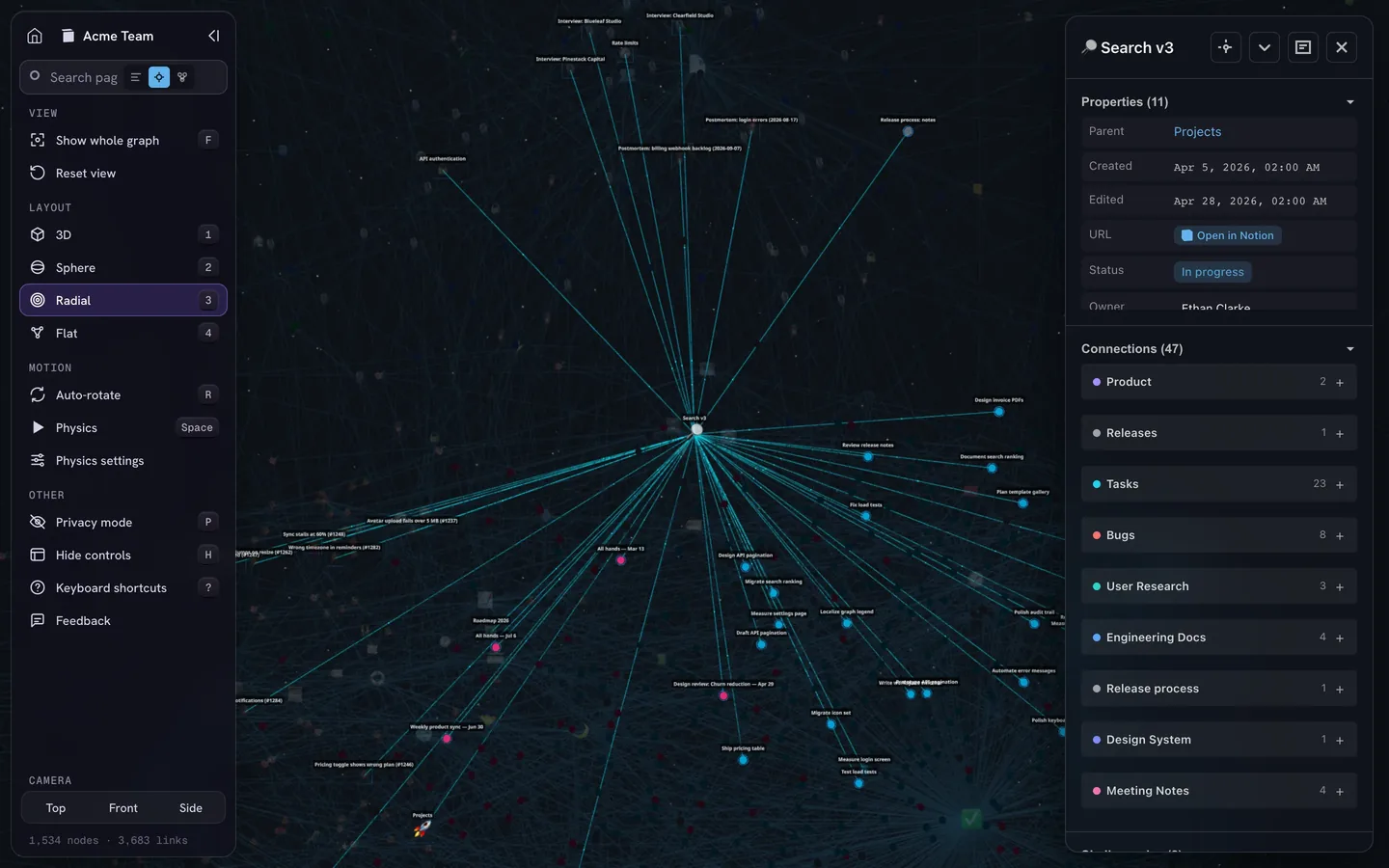
Everything a relation encodes is graph data: pages are nodes, and relations (plus backlinks, @-mentions and sub-page nesting) are edges. Notion itself shows none of this as a map, as we covered in Does Notion Have a Graph View?
IVGraph reads your workspace through the official API and draws that structure: the Projects ↔ Tasks ↔ Notes triangle from your second brain becomes a visible shape, with hubs, clusters and unconnected pages in plain sight. Use it in 3D in the app, or embed a 2D graph view widget inside a Notion page.
FAQ
What is the difference between a relation and a rollup in Notion?
A relation is the link: a property whose values are pages from another (or the same) database, like each Task pointing to its Project. A rollup is a calculation that reads through that link, like a Project showing how many of its tasks are done. A rollup always needs an existing relation.
How do I make a Notion relation two-way?
In the relation property's settings, switch on the toggle Show on [name of the related database], name the matching property and confirm. Both databases then have a relation property, and a link added on one side appears on the other.
How do I show the percent of done tasks as a progress bar in Notion?
Relate Projects to Tasks, give Tasks a Done checkbox, then add a Rollup to Projects: relation Tasks, property Done, calculation Percent checked. Set the rollup to display as a bar or ring instead of a number. If you track tasks with a Status property, use Percent per group and pick the Complete group.
Can I roll up a rollup in Notion?
No. Notion's help says rollups of rollups are not supported, to avoid unintended loops. A rollup reads properties of pages one relation away; for a two-hop answer, add a direct relation between the two databases.