 IVGraph
IVGraph API Documentation
IVGraph provides a REST API for accessing Notion workspace graph data — nodes, relationships, search, and page content. Use it to build integrations, power LLM agents, or analyze your Notion workspace programmatically.
Base URLs
| Environment | URL |
|---|---|
| Production | https://ivgraph.com/api/ |
| Production (V1) | https://ivgraph.com/v1/ |
Authentication
IVGraph supports two authentication methods:
| Method | Use Case | Header |
|---|---|---|
| JWT (Notion OAuth) | Web apps, user sessions | Authorization: Bearer <jwt_access_token> |
| Service Token | LLM agents, automation, CI/CD | Authorization: Bearer ivg_<token> |
Quick Start with Service Token
In the dashboard, service tokens are called API keys.
- Sign in at ivgraph.com via Notion OAuth. Your workspace appears on the Dashboard and syncs; a token works only with workspaces connected there.
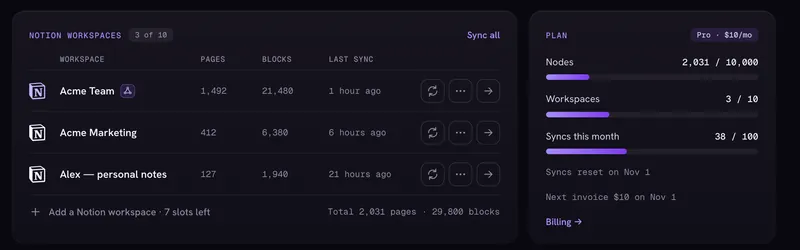
Dashboard: connected workspaces, their last sync and your plan usage. - Go to Profile → API keys and click New key.
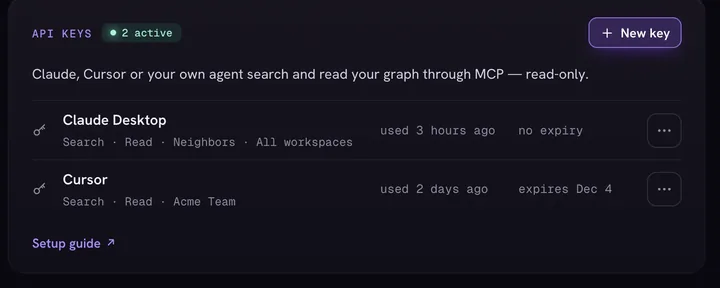
Profile → API keys: each key shows its access, workspaces, last use and expiry. - Name the key, choose its access — Search, Read, Neighbors (scopes
graph:search,graph:read,graph:neighbors) — and a workspace. Copy the key: it is shown only once. - Use the token in your requests:
curl -H "Authorization: Bearer ivg_your_token_here" \
  "https://ivgraph.com/v1/graph/search?q=project&workspace_id=YOUR_WORKSPACE_ID"
API Layers
| Layer | Base Path | Auth | Description |
|---|---|---|---|
| V1 LLM API | /v1/graph/ |
Service Token | Read-only graph access for LLM agents |
| Graph API | /api/notion-graph/ |
JWT | Full graph data (nodes + edges) |
| Search API | /api/search/ |
JWT | Full-text, semantic, and hybrid search |
| Internal API | /api/ |
JWT | Auth, billing, integrations, style rules |
| Public | /api/stats/public/ |
None | Platform stats, health checks |
Rate Limits
| API | Limit | Scope |
|---|---|---|
| V1 (Service Token) | 20 req/10s burst, 600 req/15min | Per token |
| User API (JWT) | 100 req/min | Per user |
| Anonymous | 20 req/min | Per IP |
Error Format
All errors return JSON:
{
  "error": "Short error message",
  "detail": "Extended description (optional)"
}
See Errors & Rate Limits for full error reference.
For LLM Agents
Machine-readable documentation:
ivgraph.com/llms.txt— compact API overviewivgraph.com/llms-full.txt— full documentation with examples