 IVGraph

Anytype and Notion look alike at first: pages built from blocks, databases, templates. Underneath, they make opposite bets. Notion keeps your workspace in its cloud and builds teamwork, databases and AI on top. Anytype keeps everything on your devices and encrypts it before it syncs; nobody else holds a key, Anytype included. Most differences below follow from that one choice. If Anytype’s graph view is what draws you away, that is the one part you can add to Notion without moving.
Four questions settle the choice for most people:
- Must your notes stay private, even from the company that syncs them? Anytype.
- Do you work with a team, clients or guests? Notion.
- Do formulas, rollups, automations or built-in AI run your work? Notion.
- Do you want to see your notes as a graph? Anytype has one built in; Notion needs a separate tool.
Anytype vs Notion at a glance
| Anytype | Notion | |
|---|---|---|
| Where your data lives | On your devices; the encrypted backup sits on Anytype’s EU servers, on your own server or nowhere | In Notion’s cloud |
| Encryption | End to end: only you and the people you invite hold the keys | In transit (TLS 1.2+) and at rest (AES-256); Notion holds the keys |
| Offline | Everything, by default | Desktop and mobile apps, for pages you download; not in a browser |
| Collaboration | Shared channels with roles, real-time editing and chats; no per-page permissions | Real-time editing, comments, page permissions, guests, teamspaces |
| Databases and relations | Types, properties, queries and collections; column totals, no formula language, no automations | Databases with relations, rollups, formulas, forms, charts and automations |
| Templates | Per object type, plus a community gallery | Per database, plus a large template marketplace |
| AI | No built-in assistant; an optional AI step when importing | Notion Agent on Business and Enterprise; a limited trial on Free and Plus |
| API and MCP | Local API in the desktop app, an official MCP server and an agents’ skill | Public API, webhooks and a hosted MCP server on every plan |
| Graph view | Built in, on desktop | None; third-party tools such as IVGraph |
| Platforms | macOS, Windows, Linux, iOS, Android; no browser version | Web, macOS, Windows, iOS, Android; no Linux app |
| Price | Free; paid plans from $4 a month billed yearly | Free; Plus $10 and Business $20 per member a month, billed yearly |
| License | Source available (Any Source Available License); the sync protocol is open source (MIT) | Proprietary cloud service |
In short: Anytype gives up team features and integrations to keep your data private and offline. Notion gives up that privacy to be a shared, connected workspace.
Pages and databases vs objects and types
Notion is built from pages. Every page sits in a tree under a parent page, and a database is a collection of pages that share properties. Each database has its own properties, and a relation property links rows across databases.
Anytype is built from objects. A note, a task, a person and a photo are all objects, and each one has a type. The type decides which properties the object has, which template it starts from and how it looks. Objects don’t live in folders. You reach them through their type, through links and through queries.
One book, two ways
In Notion, a book is a page in a Reading list database. Author is a relation to an Authors database, Status is a select property, Rating is a number, and your notes go in the page body. A rollup can pull each author’s country into the reading list.
In Anytype, a book is an object of the type Book. Author is an Object property that points to a Person object, while Status and Rating work as in Notion. A query such as “Books where Status is Reading” shows them as a grid, a gallery or a kanban board. A collection holds a hand-picked list, such as “Summer reading”.
What changes for your links
- Properties are shared in Anytype. One Genre property can sit on Books and on Movies, so a single query finds all your science fiction. In Notion, each database has its own properties: Genre in Books and Genre in Movies are two separate fields.
- Types can change. An Anytype object can switch type and keep its properties; a Notion page moved to another database has to fit that database.
- Hierarchy matters less in Anytype. In Notion, parent pages are part of how you find things. In Anytype, links, types and queries do that job.
Both apps link inside the text with @ and show backlinks. For a graph, this means Anytype draws lines from those links and from properties that point to other objects, while a Notion workspace holds mentions, database relations and the tree of parent pages.
Privacy, local-first and offline
Anytype: your devices hold the keys
The first time you open Anytype, it creates a vault for everything you make and a key: a 12-word recovery phrase generated on your device. The phrase replaces an email and password. Anytype never receives it, so nobody can reset it for you. If you lose it and you’re logged out on every device, Anytype’s documentation says the vault can’t be recovered.
Everything you create is stored on your device and encrypted before it syncs, even between your own devices. By default, sync runs through the Anytype Network: servers in EU data centers pass changes along and keep an encrypted backup they can’t read. Devices on one local network also sync directly. You can run your own sync server instead, or switch to local-only mode, which Anytype marks as experimental because backups become your job. Anytype is developed by Any, a Swiss association.
Anytype’s own privacy page adds two caveats: the search index on your device isn’t encrypted, so disk encryption still matters, and the app sends anonymized usage data that never includes your content.
Notion: a cloud workspace with an offline mode
Notion stores your workspace on its servers. Its security page lists encryption in transit (TLS 1.2 or higher) and at rest (AES-256). Notion holds the keys, which is what lets it offer search, sharing and AI in any browser. Enterprise adds data residency and control over encryption keys. When you use Notion AI, its AI providers keep data for 30 days on every plan except Enterprise, which gets zero retention.
Offline, Notion works in its desktop and mobile apps, not in a browser. According to Notion’s help center, you turn on Available offline in a page’s ••• menu, and on Plus, Business and Enterprise your recent and favorite pages download automatically. Subpages don’t come along, and a database brings only the first 50 rows of its first view.
What local-first costs
Anytype’s model has a price. There’s no browser version, which its FAQ explains by the security risks of browser apps. There’s no password reset. And import, export, formulas, kanban and calendar views and the graph aren’t in the mobile apps yet. Notion’s price is the reverse: it works wherever you can log in, and offline is something you prepare in advance.
Collaboration and sharing
Collaboration is where Notion is clearly ahead. Several people edit a page at once, comment on blocks and mention each other. Every page has its own sharing settings, guests can be invited to single pages (up to 10 on the Free plan), and teamspaces group work by team. Business adds private teamspaces, SAML single sign-on and database permissions that limit people to the rows assigned to them.
Anytype shares whole channels. You invite people with a link, with or without your approval, and give each one a role: viewer, editor, admin or owner. Changes appear in real time and queue up while someone is offline. Each channel has chats and discussions, and the people you invite don’t need an email address or a subscription. The owner’s plan sets how many editors a channel can have, and the Free plan includes 10 shared channels.
Two limits matter for teams. Anytype has no per-object permissions: every member sees everything in a channel, so different audiences need different channels. And to show a single object to outsiders, you publish it as a static web page; links in it to unpublished objects lead to a placeholder.
For companies, Anytype sells a separate app, Anytype for Business, with work-account sign-in and an admin console, for €20 per editor a month; readers are free. Its cloud version isn’t zero-knowledge: Anytype stores the team’s encrypted keys, so it could technically read content, though its policy is that it never does. A self-hosted version is announced.
Databases, relations and automations
Databases are Notion’s strongest feature. Relations connect databases, rollups summarize related rows, and a formula language calculates new properties. The same data appears as a table, board, calendar, timeline, gallery or chart, and forms collect new entries. Automations set properties or create pages for you: the Free plan gets buttons only, Plus and above get database automations that run when something changes, and Business adds dashboards. On other plans, a page of linked views does the same job; see how to build a Notion dashboard. Our guide to Notion relations and rollups shows how far relations go.
Anytype covers structure with types, properties, queries and collections. An Object property is its version of a relation, and a query finds objects across types by any property, with AND and OR filters. Views come as a list, grid, kanban board, calendar, gallery or graph. Compared with Notion, three things are missing:
- A formula language. Anytype’s formulas are totals at the bottom of a grid column: count, sum, average, median, minimum, maximum. You can’t calculate one property from another.
- Rollups. You can link a book to its author, but you can’t pull the author’s country into the book. Notion rollups arrive in Anytype as fixed values.
- Automations. Bulk changes happen in a view, where you select objects and edit them together, or in scripts through the local API.
If databases run your work, like a CRM or sprints with rollups, Notion does more. If you mostly need typed notes to filter, sort and link, Anytype is enough.
Graph view: built into Anytype, added to Notion
Anytype has a graph view built in. Every object in a channel is a node; lines come from links in the text, properties that point to other objects and backlinks. You open it with the icon at the top of any object. Settings hide text links or property links, show unlinked objects and filter by type, and search highlights matching nodes. Queries and collections can use a graph layout too. It works on desktop only: Anytype’s FAQ lists the graph among features the mobile apps don’t have yet. Our graph view guide compares it with the graphs in Obsidian and Logseq.
Notion has no graph view. It stores the same kinds of connections, such as mentions, backlinks, database relations and parent pages, but shows them one page at a time. Does Notion have a graph view? goes through the workarounds.
IVGraph, which we build, fills that gap without moving your notes. It connects through Notion’s own sign-in window with read-only access and draws an interactive 3D graph: pages and databases are nodes, while mentions, backlinks, relations and parent pages are links. Search jumps to any page, and the most-linked pages, the hubs and the pages nothing links to stand out. It’s free up to 500 nodes.

IVGraph isn’t a note app, and it doesn’t give Notion Anytype’s privacy model: it reads your workspace from Notion’s cloud, and it doesn’t move data between Notion and Anytype. If you need local, encrypted notes, you need Anytype. If you need the map, you don’t. For graph software beyond note apps, see our list of knowledge graph tools.
AI, API and agents
Notion builds AI into the workspace. Notion Agent chats, writes, fills database properties and translates, and AI Meeting Notes transcribes calls. Both come with the Business and Enterprise plans; Free and Plus get a limited trial. Custom Agents run recurring work on Business and Enterprise for Notion credits, $10 per 1,000. Outside Notion, Claude, ChatGPT, Cursor and other AI apps connect through Notion’s hosted MCP server, which works on every plan, Free included.
Anytype has no built-in AI assistant. AI apps connect from outside, through the desktop app:
- Local API. It runs inside the desktop app on your computer and works offline. You create keys in Settings, on the Local API page.
- MCP server. The official Anytype MCP server connects Claude Desktop, Claude Code, Cursor and other MCP apps through that API, and the Local API page copies a ready config for it. It’s open source (MIT); version 2.0.1 came out in September 2026.
- Agents’ skill. A toolkit for Claude Code, Cursor, Gemini CLI and GitHub Copilot that runs short scripts against your objects in a sandbox.
- Import with AI. Since version 0.57, the Notion importer can ask a model to suggest types and properties (see the import steps below).
One rule applies to both apps: encryption ends where you hand content to an AI. If Claude reads your Anytype notes through MCP, those notes reach Claude’s servers like any other prompt.
For agents that need the structure of a Notion workspace rather than single pages, IVGraph has a read-only API for agents on the Pro and Max plans: search, page content, neighbors and paths between pages. There’s no IVGraph MCP server yet.
Pricing
Prices from the official Anytype and Notion pricing pages on October 28, 2026, in US dollars per month unless marked:
| Plan | Anytype | Notion |
|---|---|---|
| Free | 100 MB of synced files, 10 shared channels, unlimited private channels | A limited AI trial; a block limit once a workspace has 2+ members; 5 MB per upload; 7 days of page history; up to 10 guests |
| First paid plan | Plus: $4 billed yearly or $5 monthly; 1 GB, unlimited shared channels | Plus: $10 per member, billed yearly; unlimited charts, database automations, 30 days of history |
| Second | Pro: $8 billed yearly or $10 monthly; 10 GB | Business: $20 per member, billed yearly; Notion Agent, AI Meeting Notes, SAML SSO |
| Top | Ultra: $16 billed yearly or $20 monthly; 100 GB | Enterprise: custom pricing |
| For companies | Anytype for Business: €20 per editor, 20% less billed yearly; readers free | The plans above, all priced per member |
Two differences matter more than the numbers. Anytype charges per account, for storage and for the shared channels you own: notes and other objects don’t count toward storage, and the people you invite pay nothing. Notion charges for every member and unlocks features, such as AI, automations and permissions, plan by plan. Students and educators get 50% off Anytype, and Notion’s Plus plan is free for students and educators with one member.
How to move from Notion to Anytype
Anytype imports from Notion through Notion’s API, so pages, databases and links arrive as objects, properties and links. The import runs only in the desktop app. Since version 0.57 (September 2026), it asks for a Notion personal access token; Anytype’s help page still describes an older route, covered further down.
- Create a token in Notion. In Settings, switch on Developer Mode (browser or desktop app, not mobile). Open Personal access tokens in the new developer section of the sidebar and click New token. Name it, leave only the Notion API capability and pick a short expiry, such as 7 days. Click Create token and copy it; it starts with
ntn_. A token covers one workspace and reads everything you can open there, so you don’t need to share pages with it. Workspace owners can always create one; members can on Plus, and on Business or Enterprise if an owner allows it. Details are in our Notion API key guide. - Prepare your computer. Anytype’s guide asks for a good connection, a power cable and sleep mode turned off. Large workspaces take a while, because Notion limits how fast its API answers.
- Run the import. In Anytype, open Channel Settings → Import → Notion, choose the channel that receives the content, paste the token and start.
- Decide on AI help. The optional Organize with AI step asks a model to suggest types and properties instead of importing everything as plain pages. With Anytype’s own AI service, the names of your databases, properties and select options leave your device before encryption; the text of your pages is never sent. A model running on your computer keeps everything local.
- Revoke the token. Once the import is done, delete the token in Notion’s developer settings.
What doesn’t come across
- People mentions become plain text.
- Date ranges become text.
- Formulas and rollups arrive as fixed values. They stop updating, and Anytype has no formula language to rebuild them.
- Database views. Rows and their properties come across; Notion’s views, filters and sorts don’t. Rebuild the ones you use in Anytype.
- Files can go missing on a slow connection, because Notion’s file links expire during a long import. You re-upload those by hand.
The older route and the fallback
Anytype’s help page describes an internal integration: a workspace owner creates one, gives it the Read content and Read user information capabilities, shares all top-level pages with it and pastes its secret into Anytype. Links to pages that weren’t shared turn into “page not found”. Notion now calls these internal connections; the current menus are in our API key guide.
If the import through the API fails, or you no longer have full access to the workspace, export it from Notion as Markdown & CSV and use Anytype’s Markdown import. Anytype warns that this route loses more structure and more links.
Is there an Anytype–Notion integration or sync?
No. Anytype’s documented integrations are its local API, a command-line tool, the MCP server, the agents’ skill and a Raycast extension, and none of them syncs with Notion. The import copies your workspace once; edits you make in Notion afterwards don’t reach Anytype. Going back means a Markdown round trip: Anytype exports Markdown (as well as HTML, PDF and its own Any-Block format), and Notion imports Markdown files, or a ZIP of them, as pages rather than database rows.
Before you move: see what your workspace depends on
A move is a good moment to find out which pages hold your workspace together and which ones nothing links to. Pages without links may not be worth moving; the hubs need the most checking after the import. IVGraph shows both: connect your workspace, look at the most-linked pages, then select any page to see everything connected to it, grouped by database.
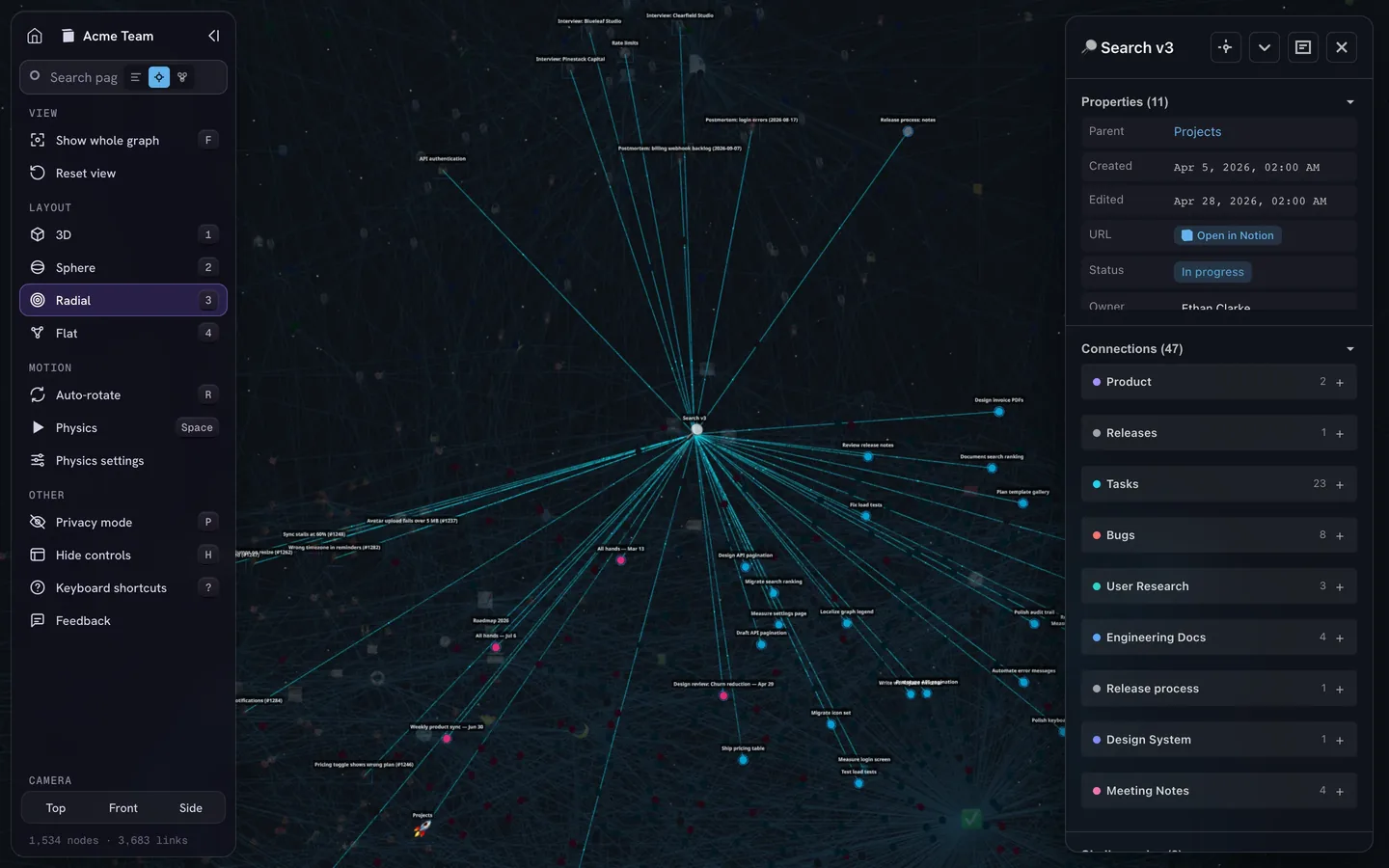
Map it before you move it. Connect Notion and see your most-linked pages and the pages nothing links to. Read-only access, free up to 500 nodes.
Map my NotionAnytype vs Obsidian
Anytype and Obsidian are the apps people name most often for private, local notes with a graph. They agree on local data and differ on almost everything else.
| Anytype | Obsidian | |
|---|---|---|
| Your notes are | Objects in an encrypted local database | Plain Markdown files in a folder |
| Readable without the app | Only after an export | Yes, in any text editor |
| Structure | Types, properties, queries, collections | Properties in each file; Bases for table, list, card, kanban and map views |
| Sync | Included and end-to-end encrypted; direct on a local network; or your own server | Obsidian Sync, end-to-end encrypted, $4 a month billed yearly or $5 monthly; or a third-party tool |
| Working with others | Shared channels with roles, real-time editing, chats | Shared vaults through Sync, up to 20 people, without live co-editing |
| Extending it | Local API, MCP server, custom CSS | More than 9,500 community plugins, themes, CSS |
| Graph view | Objects, links and properties; filter by type; desktop only | Notes and links; a local graph around each note; color groups |
| Price | Free; storage plans from $4 a month | Free, including for work; Sync and Publish are paid |
Pick Obsidian if you want files that outlive any app and a plugin for every workflow. Pick Anytype if you want types, relations and views out of the box, plus free encrypted sync and sharing. Anytype’s Obsidian importer turns [[links]] into links between objects, tags into a Tag property and front matter into properties; replace embeds with plain links first.
For the third side of this triangle, read Notion vs Obsidian. For other apps in the same space, see our Obsidian alternatives.
Also looking at Capacities or Tana?
Capacities is closest to Anytype in idea: every note is an object of a type, such as a person, a book or a project, with properties and links. Daily notes and a graph view are part of the free Basic plan, and it also runs in a browser. Pro costs $9.99 a month billed yearly and adds an AI assistant, tasks, smart queries, whiteboards and a public API. It imports Notion from a Markdown and CSV export in its desktop app; formulas arrive as results, and some relations and rollups flatten. Unlike Anytype, Capacities is a cloud service and, by its own documentation, isn’t end-to-end encrypted. So in Anytype vs Capacities, privacy decides; in Capacities vs Notion, it’s a personal object library against a team workspace.
Tana Outliner is an outliner. Everything is a bullet, and a supertag turns a bullet into a task, meeting or person with fields. AI features such as meeting transcription and voice memos run on monthly credits. The Free plan includes 500 credits; Plus costs $8 and Pro $14 a month, billed yearly. Its views are lists, tables, cards, tabs and calendars, with no node-and-line graph. Since December 2025, it imports a Notion export (Markdown and CSV, up to 1,500 files at a time) into a new workspace, without recreating database relations. Note that tana.inc now sells a separate meeting product; the note app is at outliner.tana.inc.
Both are built for personal knowledge first. For a team that needs permissions and guests, Notion remains the stronger fit.
Which one should you pick?
- You work alone and privacy comes first: Anytype. Write down the recovery phrase on day one.
- You work with a team, clients or guests: Notion. Anytype’s shared channels suit small groups where everyone may see everything.
- Your system runs on databases, formulas and automations: Notion.
- You want plain files that you control: Obsidian.
- You want typed objects with less setup: Capacities. Outlines with AI and meeting notes: Tana Outliner.
- You’re happy in Notion and only miss the graph: stay, and add IVGraph. It’s free up to 500 nodes, and moving stays an option if privacy becomes the reason.
Whatever you choose, try it on real work for a week before you move everything: import one project, rebuild one database and use it on your phone.
FAQ
Is Anytype better than Notion?
Neither is better overall. Anytype is better for privacy, offline work and owning your data: notes stay on your devices, encrypted end to end, and a graph view is built in. Notion is better for teams, databases with formulas and rollups, automations and built-in AI. Pick the one that matches how you work, not the longer feature list.
Is Anytype free?
Yes. The free plan includes 100 MB of synced files, 10 shared channels and unlimited private ones; notes and other objects don’t count toward the storage limit. Paid plans start at $4 a month billed yearly, or $5 monthly, and add storage, unlimited shared channels and an ANY ID name. If you run your own sync server, you need no membership.
Can I import my Notion workspace into Anytype?
Yes, in the Anytype desktop app: Channel Settings → Import → Notion, with a Notion personal access token. Pages, databases and the links between them come across, but people mentions and date ranges become text, and formulas and rollups become fixed values. It is a one-time copy: there is no two-way sync between Anytype and Notion.
Does Anytype have a graph view like Obsidian?
Yes, on desktop. Every object is a node, and links in the text, properties that point to other objects and backlinks draw the lines. You can filter by type and search. The mobile apps don’t have it yet. Notion has no graph view of its own; IVGraph adds one to a Notion workspace.